
Download Freeraser – Secure Delete, Data Erasure, Privacy Tool
Overview
Freeraser is a specialized utility application designed to address the critical need for permanent data deletion on Windows systems. Unlike standard file deletion methods that merely remove references to files, Freeraser ensures that sensitive information is irreversibly erased from storage devices. This functionality is particularly valuable for users handling confidential documents, personal data, or any content that must not be recoverable by third parties. The app targets individuals and professionals seeking enhanced digital privacy and data security, including remote workers, legal personnel, financial advisors, and privacy-conscious consumers.
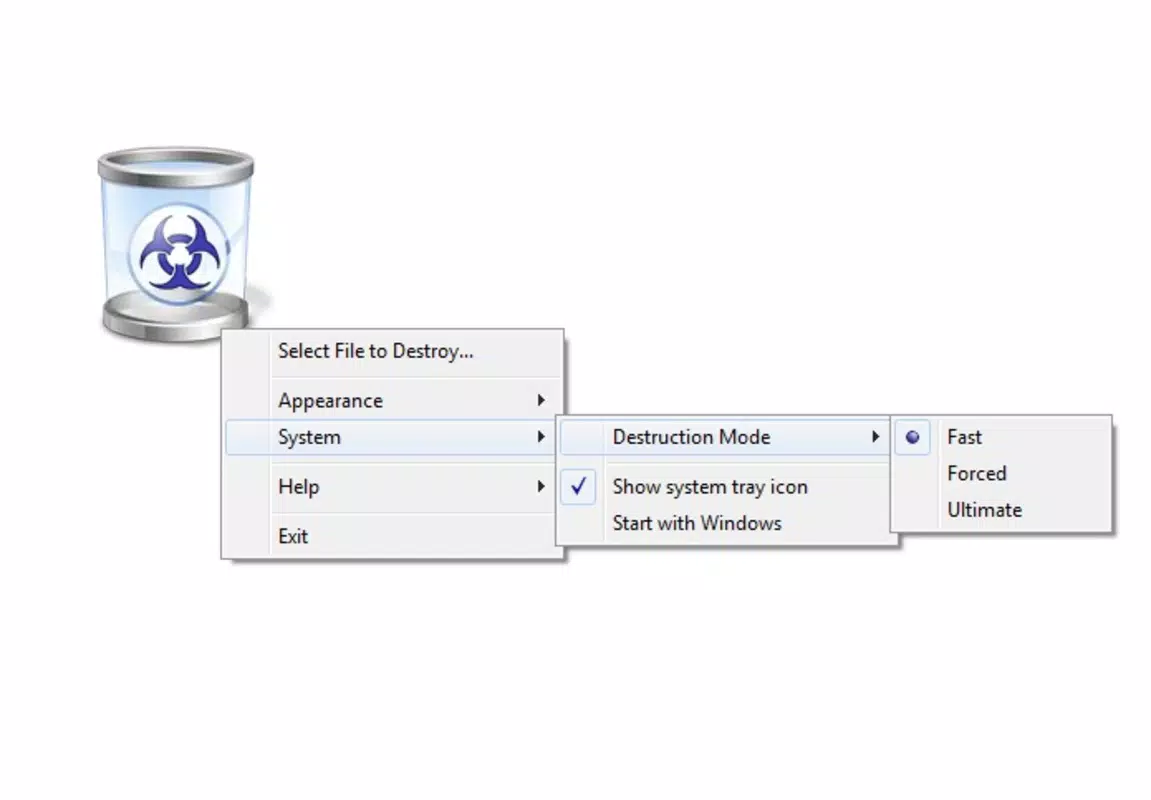
By offering a dedicated solution for secure file deletion, Freeraser fills a gap in the standard Windows file management system, where items moved to the Recycle Bin can often be recovered using third-party tools. The application provides three distinct deletion modes—Fast, Forced, and Ultimate—allowing users to tailor the erasure process to their specific security requirements. This flexibility ensures that users can balance speed and thoroughness based on the sensitivity of the data. The developer, Freeraser, has maintained the tool since its release in 2009, indicating a long-standing commitment to data privacy and utility functionality.
Freeraser operates as a lightweight yet effective tool within the broader ecosystem of digital security applications. It does not replace antivirus software or encryption tools but complements them by ensuring that deleted data does not remain vulnerable to recovery. Its presence underscores the growing importance of proactive data hygiene in an era where digital footprints can have lasting consequences. The app’s continued availability and free access further highlight its role as a foundational privacy utility.
Key Features & Functionality
- Three Deletion Modes: Freeraser offers Fast, Forced, and Ultimate deletion options. Fast mode performs a quick overwrite to prevent basic recovery attempts. Forced mode applies a more thorough erasure process, suitable for moderately sensitive files. Ultimate mode uses multiple overwrite passes to ensure complete and irreversible data destruction, meeting high-security standards.
- User-Friendly Interface: The application features an intuitive layout with drag-and-drop functionality, allowing users to easily select files for deletion. The interface minimizes technical complexity, enabling users of all experience levels to securely erase data without confusion or error.
- Permanent Deletion Assurance: Files deleted through Freeraser are not merely moved to the Recycle Bin—they are overwritten and rendered unrecoverable. This ensures that even advanced data recovery tools cannot reconstruct the original content, providing a high level of confidence in data privacy.
- Customizable Security Levels: Users can choose the appropriate deletion mode based on the sensitivity of the information. For example, a casual user might opt for Fast mode for temporary files, while a professional handling legal documents may select Ultimate mode for maximum assurance.
- Privacy Protection Focus: Freeraser is ideal for users preparing to sell or dispose of a device, as it guarantees that no trace of personal or confidential data remains. It also supports regular digital decluttering with secure removal, helping users maintain a clean and secure digital environment.
Interface, UX & Performance
Freeraser features a clean, minimalistic interface designed for straightforward operation. The layout prioritizes functionality over visual flair, with clearly labeled buttons and a direct workflow for file selection and deletion. Navigation is intuitive, requiring minimal user input to initiate a secure erase process. The drag-and-drop feature streamlines file inclusion, reducing the risk of user error during critical operations.
Although the developer did not list formal performance metrics, the application’s small file size of 1.2 MB suggests efficient resource usage. It is expected to run smoothly on a wide range of Windows systems, including older hardware, without significant impact on system responsiveness. The app launches quickly and processes deletions in real time, with no noticeable lag during operation.
Performance stability appears consistent, given the app’s long-standing presence in the market since 2009. The lack of reported crashes or compatibility issues in public forums indicates reliable execution. However, specific requirements for different Windows versions were not disclosed, so users should exercise caution when deploying on outdated or non-standard configurations. Overall, the UX is optimized for speed, simplicity, and security, making it accessible to both novice and experienced users.
Platform Compatibility & Technical Requirements
Freeraser is designed for the Windows platform and operates on Windows-based systems. The current version is 1.0, with a file size of 1.2 MB, indicating a lightweight and efficient application. The developer did not specify minimum OS requirements or compatibility details for different Windows editions (e.g., Windows 7, 10, 11).
Given its release date in 2009, the app was originally developed for earlier Windows versions. However, its continued availability suggests it may still function on modern systems, though this is not confirmed. Users should verify compatibility with their specific system configuration before installation. The absence of detailed technical specifications means that advanced users may need to test the app in their environment to ensure full functionality.
Pros and Cons
- Free to download and use with no hidden costs
- Offers multiple deletion modes for customizable security levels
- Simple drag-and-drop interface suitable for all user levels
- Permanently erases files, preventing recovery by standard tools
- Small file size ensures minimal system impact
- Developer did not provide detailed compatibility information for modern Windows versions
- No official update history or version changelog available
- Interface is minimalistic, which may lack visual appeal for some users
- No support for cloud storage or external drives documented
- Limited documentation or in-app guidance beyond basic functionality
FAQ
Is Freeraser safe to use?
Yes, Freeraser is designed to securely delete files without compromising system integrity. It does not contain malware or intrusive behavior. However, users should ensure they are downloading from trusted sources.
Can I recover files after using Freeraser?
No. Once files are deleted using Freeraser, they are overwritten and cannot be recovered using standard data recovery tools. The Ultimate mode provides the highest level of assurance against recovery.
Does Freeraser work on Windows 10 and Windows 11?
The developer did not specify compatibility with Windows 10 or 11. While the app may function on these systems, users should test it in their environment to confirm performance and stability.
Is Freeraser available for Android or iOS?
Freeraser is currently designed for Windows only. There is no official version available for Android or iOS platforms.
How often should I use Freeraser?
Use Freeraser whenever you need to permanently delete sensitive files, such as when disposing of a device, sharing a computer, or removing confidential data from your system.
Final Thoughts + CTA
Freeraser stands as a dependable and no-frills utility for users who prioritize data privacy and irreversible file deletion. Its multi-tiered deletion system, combined with a straightforward interface, makes it a practical choice for both everyday users and professionals handling sensitive information. While the app lacks modern polish and updated documentation, its core functionality remains effective and relevant in today’s digital landscape.
For individuals seeking a free, lightweight tool to permanently erase files from their Windows devices, Freeraser delivers on its promise without unnecessary complexity. It is especially valuable when preparing a computer for resale, donation, or long-term storage. The absence of cost and the focus on security make it a smart addition to any digital hygiene routine.
Download Freeraser now to ensure your private data stays private—forever.


